

 تحميل(606.78KB)
 2.0.3
2.0.3
 2.33MB
 الإصدار
2.01
الإصدار
2.01
 تاريخ التحديث
January 30, 2026
تاريخ التحديث
January 30, 2026
 الفئة
النشرة الإخبارية الاجتماعية
الفئة
النشرة الإخبارية الاجتماعية
 الحجم
606.78KB
الحجم
606.78KB

Swarachakra is a logically ordered keyboard, found to be easy to use for newbies
মোদের গরব, মোদের আশা, আ-মরি বাংলা ভাষা - অতুলপ্রসাদ সেন
If your device can display this sentence in Bengali perfectly, then your device supports Bengali and Swarachakra should also work well. If you do not see any text, or if some of the words are incorrect, Swarachakra may not work well.
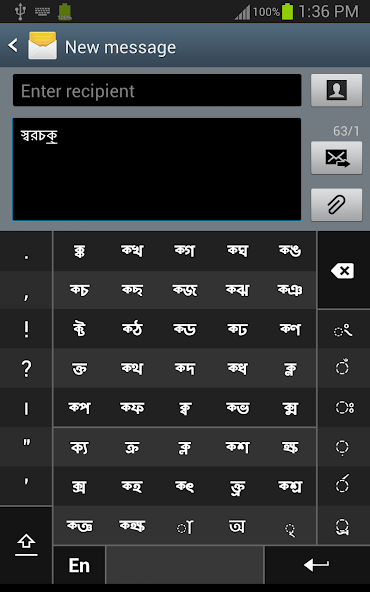
Swarachakra Bangla (স্বরচক্র বাংলা) is a touch-screen keyboard for inputting text in Bengali. (Swarachakra is also available in Hindi, Marathi, Gujarati, Telugu, Kannada, Malayalam, Odia, Punjabi, Konkani and Tamil). Swarachakra uses a logically ordered design based on the structure of Bangla script. يعرض الساكنة المتسلسلة وفقًا للهيكل المنطقي للنص المنطقي ، المجمعة صوتيًا وترتيبًا في شبكة مماثلة لتلك الموجودة في معظم الكتب المدرسية.
Typing with Swarachakra
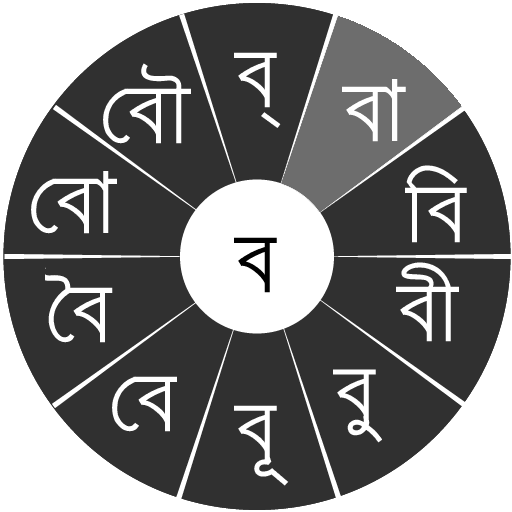
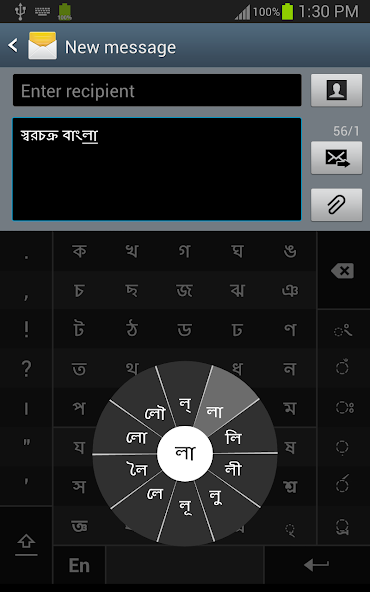
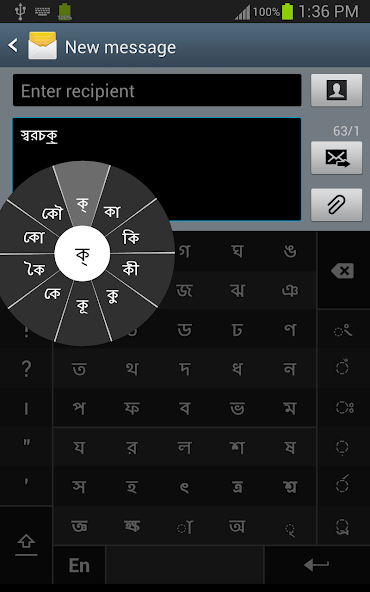
In Bangla, we frequently need to type a combination of a consonant ( ধ ) and a matra ( ো ) like ধ + ো = ধো . عندما تلمس ساكنًا ، تتدفق شقرا مع مجموعة من الحروف الساكنة و 10 مصفوفة متكررة ( ধা ، ধি ، ধী ، ধু ، ধূ ، ধে ، ধৈ ، ধো ، ধৌ .. ). The chakra gives a preview of the possible character combinations. To select a combination, you slide the stylus or finger towards it.
Typing conjuncts like ক্রি , ষ্থ, চ্য় is particularly hard for most people. Swarachakra makes it easy. First tap on the first part of the combination and select the halant from the chakra ( স + ् ). ثم يعرض Swarachakra معاينة لجميع النقلات الممكنة التي تبدأ بهذا الساكن ( স + ् + থ = স্থ ؛ চ + ् + য় = চ্য় إلخ). إذا كنت بحاجة إلى إضافة Matra ، فحددها من شقرا جديدة كما كان سابقًا ( স্থা ، স্থি ، স্থী ، স্থু ، স্থূ ... ).
للنوع A B> rafar ( র্থ ) ، أو Rashtrachinha (ত্র) أو Nukta (ড় ، খ়) ، حدد أولاً المفتاح المقابل من المفاتيح السفلية اليمنى ، ثم اكتب كالمعتاد.
Complete vowels ( অ আ ই ঈ উ ঊ এ ঐ ও ঔ ) appear in a separate chakra on the bottom right. The less used vowels and matras are next to it ( ঽ ৎ ৃ ঋৄ ৄ ৠ ৢ ঌ ৣ ৡ ). Numerals, symbols and rarely used characters appear on a shift. You could also switch to the QWERTY keypad temporarily to input English characters.
Installing Swarachakra
First, install Swarachakra Bangla by clicking the “Install” button above.
Next, you need to “enable” the keyboard. لتمكين ، فتح "الإعدادات" ، حدد "اللغة والإدخال" وتحديد المربع أمام স্বরচক্র বাংলা (Swarachakra Bangla) في قسم "لوحة المفاتيح وأساليب الإدخال".
أخيرًا ، انقر فوق خيار "الافتراضي" في قسم "لوحة المفاتيح وأساليب الإدخال" ، وحدد স্বরচক্র বাংলা (Swarachakra Bangla) كوحة المفاتيح الافتراضية. (Sorry, but that's how Android works)
NOTE: Swarachakra is designed for Android 4.0 (ICS) onwards. It does not work right now on older versions because they do not have Unicode support.
 شاهد المستخدمون أيضًا
عرض الكل
شاهد المستخدمون أيضًا
عرض الكل
updated
updated
updated
updated

updated
updated
updated
updated
updated
updated

updated

updated
 العاب شعبية
عرض الكل
العاب شعبية
عرض الكل
updated

updated
updated

updated
updated
updated
updated
updated
updated

updated

updated
updated